Using Ruskin
Ruskin is the only tool you need to manage all your RBR instruments and measurement data, as well as the RBRglissando. Associate your instrument with the winch for seamless operation.
For a detailed description on how to install and update Ruskin, see Ruskin User Guide: Standard Instruments3, sections 1-4 (available on the RBR website or on Ruskin, Help > Documentation).
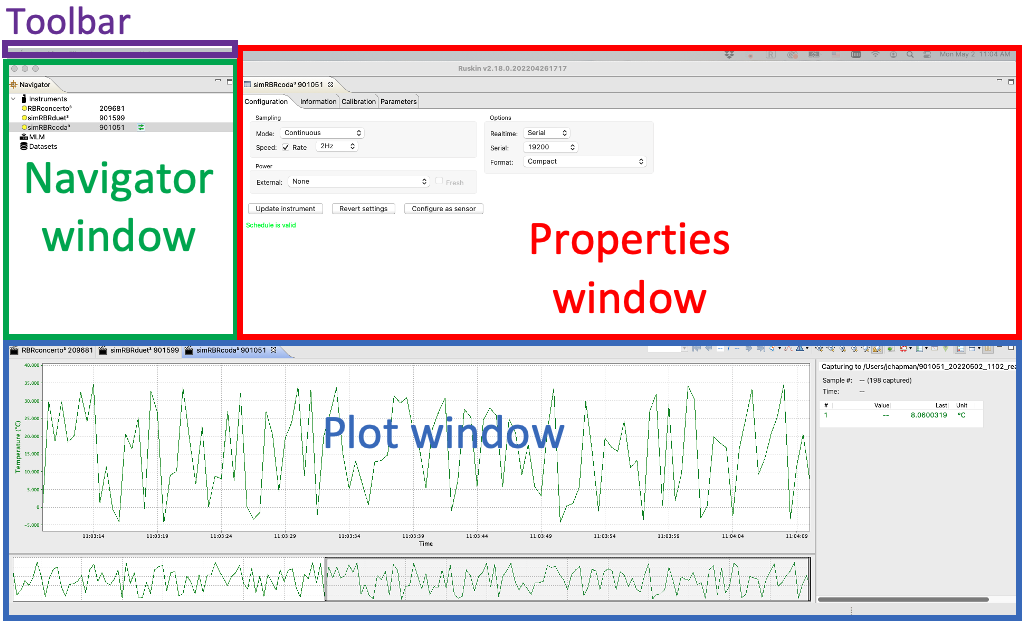
Ruskin software has a user-friendly interface which consists of a Toolbar and three main windows: Navigator, Properties, and Plot.
The Toolbar at the top left above the Navigator window has four dropdown menus. If you are using a Mac computer, it appears as follows:

On a Windows PC, the Toolbar looks slightly differently:

The rest of the interface is the same between the two systems.