Setting up manual speeds
The RBRglissando ships with the manual speeds configured. These are the speeds used by the handheld remote control unit and, generally, should not be changed.
|
Exercise caution when changing default settings. |
Steps
-
Connect the winch to Ruskin and open the Configuration tab.
-
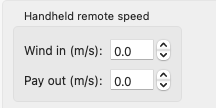
Go to Settings > Handheld remote speed.
-
Change the Wind in and Pay out values using the up and down arrows or by typing in the required speed.
Now the remote control unit will use these speeds when the UP / DOWN button is pressed.