Configuring the RBRglissando
The Configuration tab has two parts: Information and Settings.
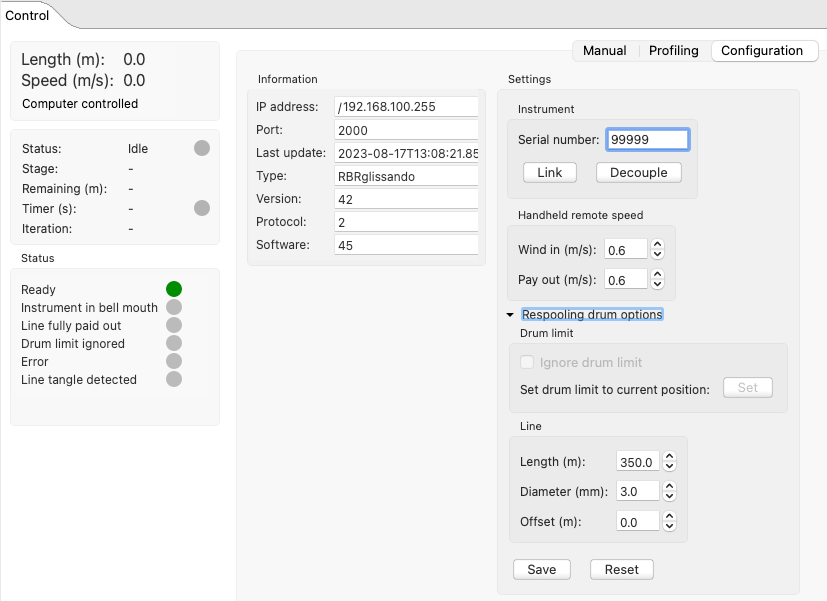
Information lists several system parameters, and these values are not editable.
Settings has three sections, Instrument, Handheld remote speed, and Respooling drum options.
-
Instrument.
This section provides the option to link your RBRglissando to an instrument when this instrument is not connected to Ruskin.
Enter the serial number of your instrument in the box and click Link. It will appear in the Navigator window under the RBRglissando node.
To decouple the winch and the instrument, simply click Decouple. It will reset the RBRcervello and drop the connection. -
Handheld remote speed.
This section allows for adjusting the manual speeds for the handheld remote control unit. -
Respooling drum options.
This section is collapsible. Click on the arrow to open the available fields for adjusting the drum limit and the line parameters.
Generally, you do not need to change any parameters under 2 and 3 above. Your RBRglissando ships with the line already spooled on the drum, all respooling drum options set up, and manual speeds configured.
|
Changing these settings may render the winch inoperable. Proceed with caution. |
If undertaking any changes, refer to applicable Maintenance sections for instructions.