Adjusting profiling parameters
Depending on the profiling parameters, you can use the Haul, Emerge, and Recover stages to download your dataset. Potentially, you could use the sum of the three pause times if the repetitions Type is set to None.
The instrument needs to be close enough for Ruskin to connect and pause long enough for the download to complete. When you haul the instrument out of the water, the Wi-Fi will turn on close to the surface and stay on for three minutes. If the instrument is still too far from the boat, make sure to bring it closer before the idle time runs out. After it connects to Ruskin, you need to maintain a close distance to continue downloading. If necessary, use the Pause button to allow the download to complete.
Here are some examples of setting up the instrument position and pause time to facilitate download.
Example 1
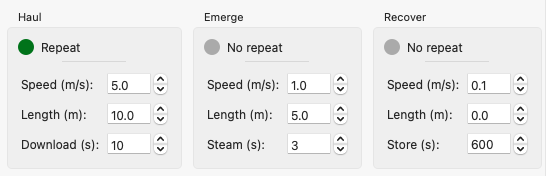
Haul the instrument to the position of 10m, pause for 10s, then repeat the Drop and Haul stages four more times, downloading at the end of every Haul stage. After the fifth iteration, download for the last 10s of the Haul stage, for 3s at the end of the Emerge stage, and finally continue downloading while storing it in the bell mouth to ensure it is complete.
Example 2
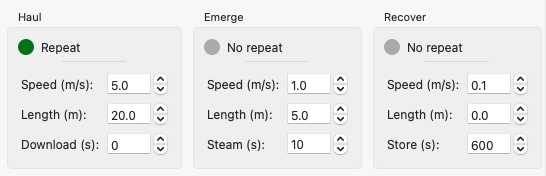
Do not pause at the end of the Haul stage, going to the next iteration immediately. Steam for 10s at the end of the Emerge stage to ensure Ruskin detects the Wi-Fi signal from the instrument and then recover the instrument. Leave it in the bell mouth to allow for the download to complete.
|
When the instrument is out of the water and visible, you can stop the cycle and lift the instrument using manual controls on Ruskin or on the handheld remote. |
|
If the instrument is recovered but the Wi-Fi is off, use twist activation to turn it on. |