Setting a drum limit
When respooling a new line on an empty drum, you need to set a new drum limit, that is, the maximum line position.
Steps
-
Connect the winch to Ruskin and open the Configuration tab.
-
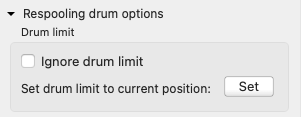
Open Respooling drum options under Settings.

-
Under Line, enter the line length and click Save.
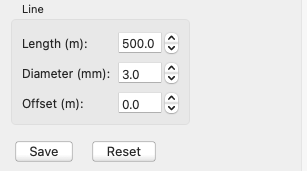
The RBRglissando uses the 3mm Dyneema line. The Offset (m) should be zero.
Do not change the default values for Diameter (mm) and Offset (m) unless spooling a different gauge of the line.
-
Turn the power off using either the Mains switch on the control cabinet or the ON /OFF switch on the handheld remote control.
-
Feed the new line through the rollers to the drum and secure the end.
-
Turn the power on and push RESET on the handheld remote control.
-
On Ruskin, reconnect to the winch.
-
Go to the Manual tab and set up the wind-in speed appropriate for your circumstances.
-
Carefully spool ten windings of the line onto the drum.
-
Go to the Configuration tab and open Respooling drum options under Settings.
-
Under Drum limit, click Set.