RBR ODO sensor care and maintenance
The RBR optical dissolved oxygen sensors have an oxygen-sensitive substrate that requires special care. Any damage will permanently affect performance.
|
Avoid direct sunlight. Never touch the sensitive element while cleaning or handling. |
|
Use the storage cap when the sensor is not in use. |
Storage
Store the RBR optical dissolved oxygen sensor in the dedicated storage cap to protect it from damage.
Storage caps are provided with the instrument. Contact RBR if a replacement is needed.
Short-term storage (three weeks or less)
|
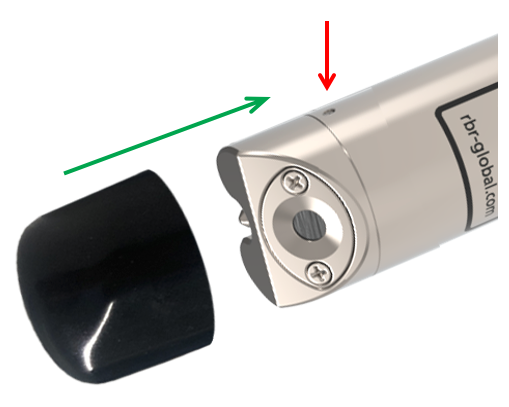
Fig. 29. The RBRcoda ODO with storage cap: note the red arrow showing the location of the locking pin
|
Long-term storage (more than three weeks)
|
For longer storage periods, store your sensor dry. Rehydrate for five days before deployment. |
-
Place an empty cap on the sensor and gently push it past the locking pin.
-
Before deployment, fill the storage cap with clean water as for short-term storage, place it on the sensor, and rehydrate for five days.
|
It takes up to five days for a dry ODO sensor to equilibrate after being placed in water. Insufficient hydrating time before deployment may lead to unreliable data. |

First deployment
RBR ships the RBRduet³ T.ODO instruments with a hydrated storage cap on, so that the instrument is ready for its first deployment.
However, long transportation times and low cabin pressure may cause the water to evaporate. Verify that the storage cap is still wet. If not, rehydrate the sensor for five days before deployment.
Calibration
Check your sensor calibration before each deployment in saturated fresh water. If the readings are not within 1% of 100% saturation, recalibrate the instrument using a one-point calibration. Typically, | fast instruments may need recalibration more often than standard or | slow. See Ruskin User Guide: Compact Instruments³ for user calibration instructions.