Retrieving data
|
In order to retrieve data from the RBRcervello you need to use the diagnostic menu.
-
Open the instrument as described in Opening the instrument.
-
Make sure the unit is powered.
-
Connect the provided USB patch cable to the instrument and computer.
Make sure that Ruskin isn’t running when you connect the instrument.
-
Open a serial terminal as described in Using the internal USB port.
-
Disable the instrument using the "disable" command.
-
Check that all the instruments are disabled using the "status" command.
-
Use the "mount-storage" command to expose the data to the host computer.
RBRcervello> mount-storage
Checking deployment status...
Stopping services...
Mounting data partition as read-only
|
In MacOS the USB cable needs to be unplugged and replugged to the laptop in order for the drive to be detected. |
-
Copy the data from the "RBRcervello" drive that is shown on the computer.
-
Use the "unmount-storage" command to cleanly disconnect the drive.
-
Securely close the instrument.
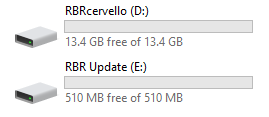 Fig. 11. Drives after using mount-storage