Quick start guide

The RBRduet³ T.ODO is a small temperature and optical dissolved oxygen instrument with low power consumption and high stability. The | fast variant has a time constant of only 1s and is well suited for profiling applications. The | slow version has a protective layer to facilitate automated cleaning by a wiper, which keeps it biofouling-free during long-term moored deployments.
Included with your instrument
-
Storage cap
-
One AA-type battery
-
O-rings
-
O-ring removal tool
-
Silicone compound
-
Desiccant
-
USB-C desktop cable with adaptor
-
USB stick containing Ruskin software and documentation
-
Calibration certificates*
*Calibration certificates are available in Ruskin. To download, connect your instrument, go to Information, and select the Download button.
Ruskin software
Find Ruskin software for Mac and PC on the USB stick included with your instrument, or visit rbr-global.com/products/software.
Deploy
-
Connect the USB-C desktop cable to the instrument. The instrument will appear on Ruskin.
-
Select the required Sampling mode and speed.
-
Select UTC or Local to synchronise the instrument clock to the computer.
-
Choose whether to start Now or enter your desired Start date/time.
-
Ensure the Battery selection reflects the chemistry installed.
-
Review the estimated End date to ensure it fulfils the deployment requirements. Longer deployments can be achieved with better battery chemistry or lower sampling speeds.
-
Click Enable to start the deployment.
Download
-
Connect to the instrument.
-
Select the Download... button and choose a location to store the dataset.
Protect your optode
The RBR optical dissolved oxygen sensors have an oxygen-sensitive substrate that requires special care. Any damage will permanently affect performance.
-
Avoid direct sunlight
-
Never touch the sensitive element while cleaning or handling
-
Use the storage cap when the sensor is not in use

Short-term storage (three weeks or less)
-
Fill the storage cap with distilled water until about 50% full.
-
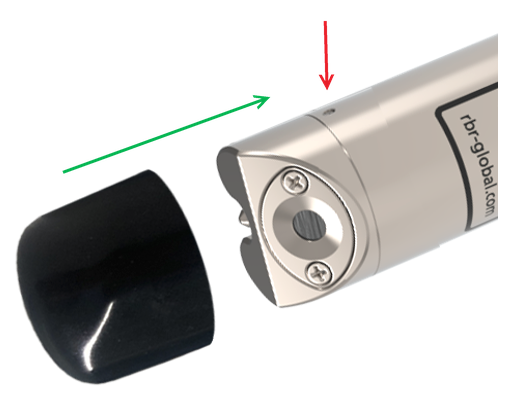
Place the cap on the sensor and gently push it past the locking pin.
-
Refill the water once a week during storage.
Long-term storage (more than three weeks)
| For longer storage periods, store your sensor dry. |
-
Place an empty cap on the sensor and gently push it past the locking pin.
-
Before deployment, fill the storage cap with distilled water like for short-term storage, place it on the sensor, and rehydrate for five days.
It takes up to five days for a dry optode to equilibrate after being placed in water. Insufficient hydrating time before deployment may lead to unreliable data. Always remove the batteries from the instrument during long-term storage! Doing so will prevent internal damage due to battery leakage and/or corrosion.
Deployment considerations
RBR ships the RBRduet³ T.ODO instruments with a hydrated storage cap on, new lithium iron batteries and fresh desiccant capsules included, and the O-rings installed, so that the instrument is ready for its first deployment.
| Long transportation times and low cabin pressure may result in the loss of water. Verify that the storage cap is still wet. If not, rehydrate the optode for five days before deployment. |
For any subsequent deployment:
-
Hydrate the optode for at least five days.
-
Install new batteries.
For replacement, use any battery chemistry except for lithium thionyl chloride (LTC). The optode will not work correctly on the LTC battery. -
Install fresh desiccant (orange).
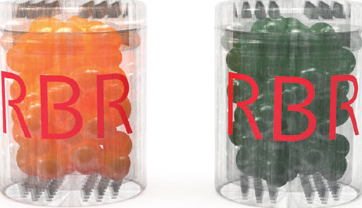
Fresh desiccant Exhausted desiccant
-
Inspect, clean, replace, and lubricate O-rings.
Always remove the batteries from the instrument during long-term storage! Doing so will prevent internal damage due to battery leakage and/or corrosion.
Support
To access support within the Ruskin app, navigate to Help > Comment on Ruskin....
For technical support, please reach out to [email protected], call +1 613 599 8900 (UTC-5), or visit rbr-global.com/support/service.