Quick start guide

Included with your RBRcoda³ T.ODO
-
Storage cap
-
Syringe
-
USB stick containing Ruskin software and documentation
-
Cables
-
Calibration certificates*
*Calibration certificates are available in Ruskin. To download, connect your instrument, go to Information, and select the Download button.
Deploy
RBR realtime sensors begin streaming data as soon as power is provided. The data streamed or fetched from your RBRcoda³ T.ODO are automatically saved to your computer.
Protect your optode
The RBR optical dissolved oxygen sensors have an oxygen-sensitive substrate that requires special care. Any damage will permanently affect performance.
-
Avoid direct sunlight
-
Never touch the sensitive element while cleaning or handling
-
Use the storage cap when the sensor is not in use
Deployment considerations
RBR ships the RBRcoda³ T.ODO sensors with a hydrated storage cap on, so that the instrument is ready for its first deployment.
| Long transportation times and low cabin pressure may result in the loss of water. Verify that the storage cap is still wet. If not, rehydrate the sensor for five days before deployment. See Short-term storage (three weeks or less) for details. |
Follow these precautions to ensure faultless operation:
-
Do not exceed the maximum depth rating (6000m)
-
Do not apply physical stress to the housing
-
Do not attempt to open the sensor
For mooring or mounting applications, contact RBR for proper clamps and brackets. Improper mounting may damage the sensor.
Before any subsequent deployment, rehydrate the optode for at least five days.
Storage cap
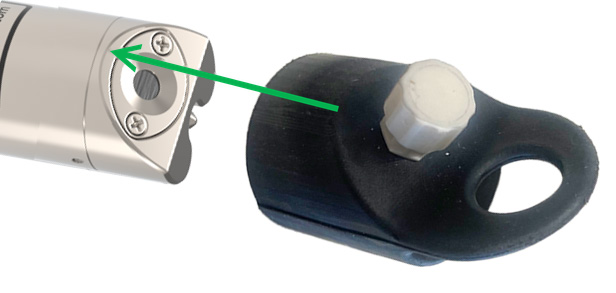
Your RBRcoda³ T.ODO instrument comes with a specialised storage cap, designed for the sensor mounted inside a vehicle. This storage cap has an opening for refilling the water with a syringe.

Short-term storage (three weeks or less)
-
Place the storage cap on the sensor, aligning its slanted shape with the angled optode, and gently push down until it stops.
Note: There is a ridge inside the storage cap which prevents it from going too far and ensures there is space left for water.
-
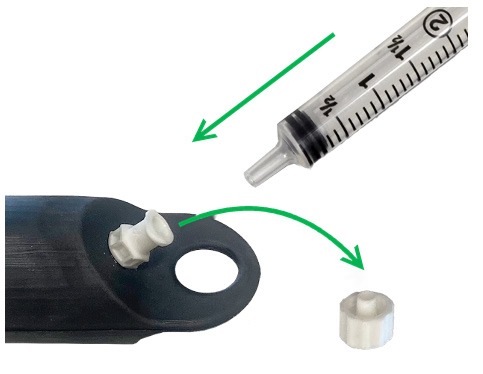
Unscrew the little white cap and put it aside.
-
Fill the syringe with distilled water.
-
Insert the syringe tip in the orifice.
-
Gently push down the piston to inject until full.
-
Remove the syringe.
-
Replace the little white cap.
-
Refill the water once a week during storage.
Long-term storage (more than three weeks)
For longer storage periods, store your sensor dry.
-
Place an empty cap on the sensor and gently push down until it stops.
-
Before deployment, refill the cap with distilled water like for short-term storage and rehydrate for five days.
It takes up to five days for a dry optode to equilibrate after being placed in water. Insufficient hydrating time before deployment may lead to unreliable data.
Support
To access support within the Ruskin app, navigate to Help > Comment on Ruskin....
For technical support, please reach out to [email protected], call +1 613 599 8900 (UTC-5), or visit rbr-global.com/support/service.